
9.3Approving and rejecting
Last updated
Anyone whose active role holds operations:approve can decide a waiting operation, provided the role may also use the directory the operation was queued for. There are three places to do it: the Operations page, the live notification cards, and the approval email.
When you approve, the platform runs the original request immediately, against the directory it was queued for, and records the outcome. Approving therefore means "approve and execute".
9.4.1 Deciding from the Operations page
To approve or reject an operation from the Operations page:
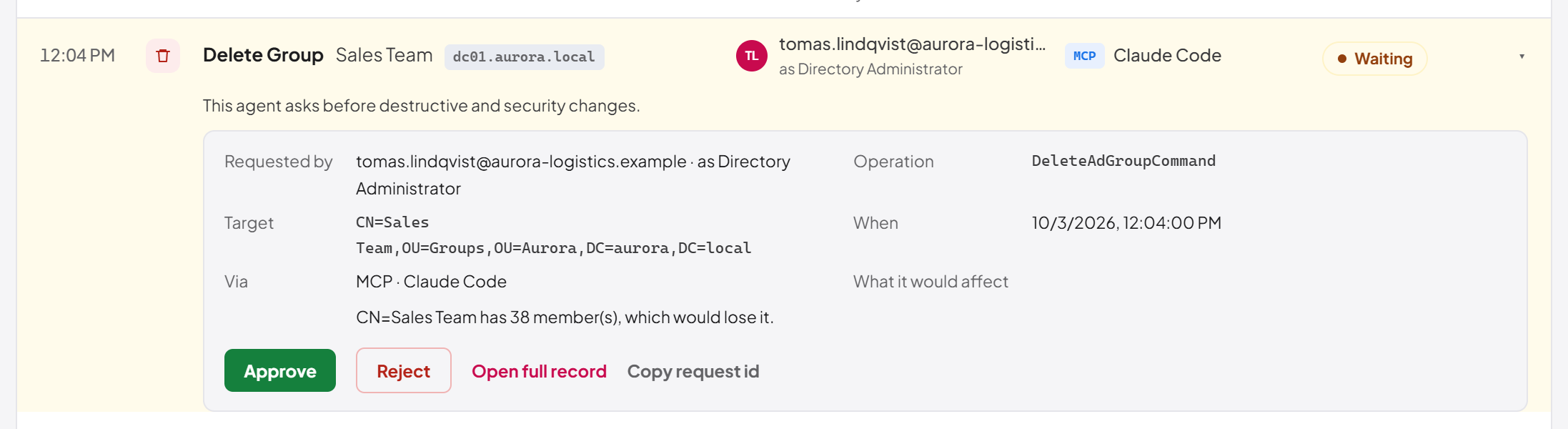
- Open Operations. Waiting operations have an amber background and a Waiting pill. To see only them, select the waiting count in the header line or Waiting in the stat bar.
- Select the operation's line to open it. Read the reason under the line and, in the expanded line, what it would affect. To see the attribute changes as well, select Open full record.
- Select Approve to run the operation, or Reject to refuse it. There is no confirmation step: the decision takes effect at once. In the detail window the same buttons read Approve & Execute and Reject.
A message confirms the decision, for example Operation "Delete Group" approved and executed. The line updates where it is, with its final status.
| Error code | Meaning |
|---|---|
Operation.NotPending | The operation is no longer waiting: somebody decided or cancelled it, or (for a rejection) it has expired. |
Operation.DecisionInProgress | Another approver's decision reached it first. Refresh to see the outcome. |
License.NotActivated | No active licence. A directory operation cannot run until a licence is active; the request stays waiting. |
Operation.NoDirectory | An old request was queued without a directory. Reject it instead. |
Operation.DecisionRequiresPerson | The call came from an API key or agent, not a person. |
Important: Approving runs the change with the directory connection's service account. Read why it is waiting and what it would affect before you approve, particularly for deletes and for anything flagged as a protected target.
9.4.2 Dismissing a failure
A failure keeps its red background until somebody has seen it. To dismiss one, select its line and then Dismiss. The operation stays Failed and stays in the log: dismissing only records that a person has seen it, and removes the red background. Dismissing requires operations:approve.
9.4.3 Opening a specific operation by link
A link to /dashboard/operations?operationId=<id> opens that operation's detail directly, wherever it falls in the list. This is the link an AI agent gives its user when a request was queued and the user can approve it, and the link behind Review on the My Waiting Operations page. If the operation does not exist, or belongs to a directory your role cannot use, the page shows "The linked operation could not be found, or you cannot view it."
9.4.4 Deciding from a live notification
If live notifications are on, a waiting operation appears as a card in the corner of the console for anyone who may approve. The card stays until it is decided and offers Approve & Execute and Reject. See 9.7.
Last updated
Thank you for your feedback.