
7.3Reading the listing
Last updated
The heading line
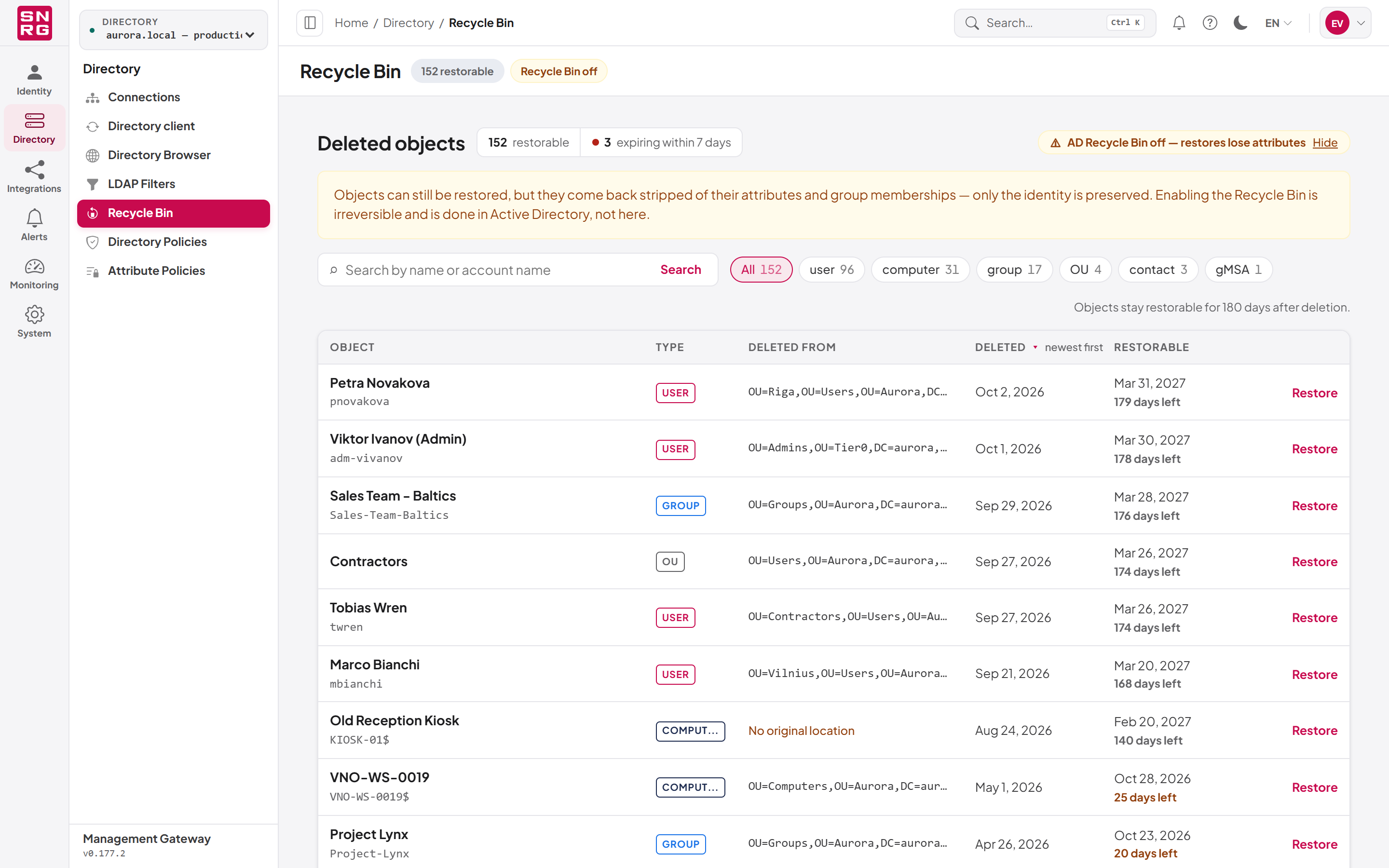
Under the page heading Deleted objects you see:
- The number of restorable objects, followed by restorable.
- When any objects are close to being recycled, a highlighted count followed by expiring within 7 days. Seven days is the window the platform uses for "expiring soon"; the same window colours the rows.
- counts are a minimum when the recycle bin holds more objects than the count is allowed to walk (20,000). In that case every figure on the screen is a floor rather than a total, and the total shows a plus sign (for example "20000+"). Hover over the label for an explanation.
- When the Active Directory Recycle Bin feature is off, a warning pill reading AD Recycle Bin off — restores lose attributes. Select Learn more to expand the explanation: objects can still be restored, but they come back stripped of their attributes and group memberships, and enabling the feature is done in Active Directory, not here. Select Hide to collapse it again.
Searching and filtering
The toolbar above the table has three controls:
- Search by name or account name: type part of an object's name or its sAMAccountName (pre-Windows 2000 logon name), then press Enter or select Search. The match is case-insensitive and finds the text anywhere in the name.
- Type chips: All, followed by one chip for each object type actually present in the recycle bin, largest first, each with its count. Select a chip to show only that type. Common types are shortened: OU for organizational units, MSA and gMSA for managed service accounts, PERSON for contacts and inetOrgPerson objects; other types show the Active Directory class name.
- Clear filters: appears when a search or type filter is active and removes both.
On the right of the toolbar the screen states how long objects stay restorable in this directory, for example "Objects stay restorable for 180 days after deletion." This comes from the directory's own configuration; when the directory reports none, Active Directory's default of 180 days applies.
Searches and type filters are applied by the server across the whole recycle bin, not only to the rows already loaded.
The table
| Column | What it shows |
|---|---|
| Object | The name the object had before it was deleted, with its account name underneath when it has one |
| Type | The object's class as a coloured badge |
| Deleted from | The container the object was deleted from, which is also where a restore puts it by default |
| Deleted | The date of deletion |
| Restorable | The date after which the object can no longer be restored, and the time left |
The time left is shown as N days left, 1 day left or last day. It is coloured red when the object is within the expiring-soon window, amber when it has 30 days or fewer, and muted otherwise. This is the one screen in the console where waiting removes an option, so plan restores for anything red first.
When Deleted from reads No original location, Active Directory did not record where the object came from. You can still restore it, but you must name a destination container in the restore dialog.
Sorting and paging
Select the Deleted column heading to switch between newest first and oldest first. Active Directory cannot sort its recycle bin itself, so this orders the rows loaded so far, not the whole recycle bin. Objects without a readable deletion date always sort last.
The table loads 50 objects at a time. The footer shows Showing N of M (or Showing N while a search is active, because the number of matches is not known in advance). Select Load more to fetch the next 50.
If nothing has been deleted, or everything deleted has already passed its restorable window, the table says so. Objects that Active Directory has already recycled never appear, because nothing can restore them.
Last updated
Thank you for your feedback.