
13.4Connected Agents (administration)
Last updated
The Connected Agents page shows every agent connected to any account over OAuth. Use it to review what agents can do, to tighten or loosen an agent's supervision, and to disconnect one.
To open it, select Identity in the navigation rail, then Connected Agents in the Identity & Access panel. The page is at /dashboard/connected-agents.
| Permission | Allows you to |
|---|---|
agents:list | Open the page and see every connected agent |
agents:manage | Disconnect agents and change their supervision |
operations:approve | Set an agent to Acts freely (in addition to agents:manage) |
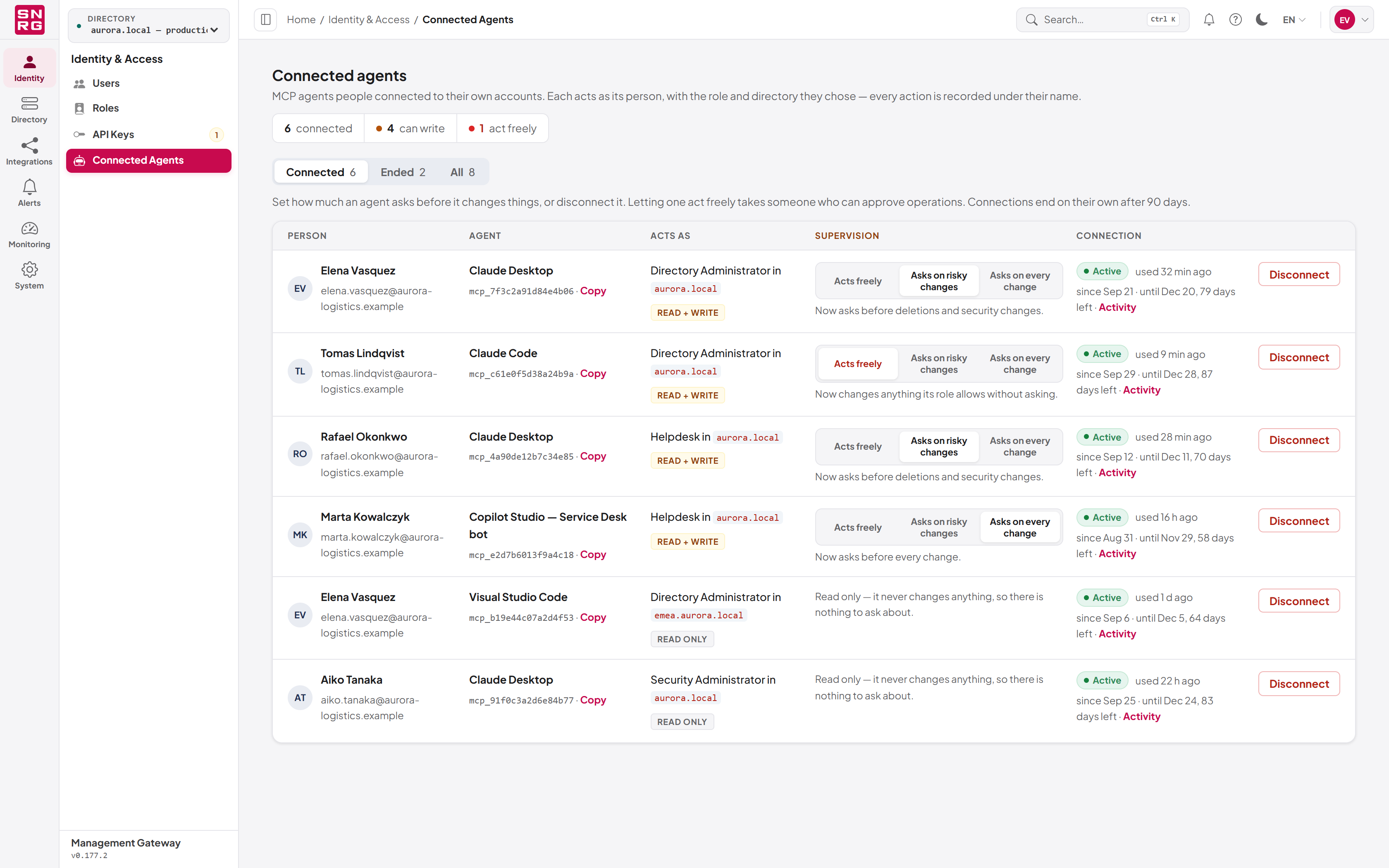
| Column | Shows |
|---|---|
| Person | Whose account the agent acts as |
| Agent | The agent's name and client ID, with Copy |
| Acts as | The role and directory chosen at consent, and Read only or Read + write |
| Supervision | The agent's level, and controls to change it (read-and-write agents only) |
| Connection | Active, when it was last used, the period it is valid for, days left and an Activity link — or, for an ended connection, why and when it ended |
The Activity link opens the operations log filtered to that one connection (it needs audit:list, the permission to read the operations log). An ended connection shows its reason, for example Disconnected by its person, Disconnected by an administrator, Reached its time limit, Signed out by the agent, Ended with all of its person's sessions or Cut off: a refresh token was reused.
Changing an agent's supervision
The Supervision column shows three steps: Acts freely, Asks on risky changes and Asks on every change. To change the level, select a step. The line beneath confirms the new behaviour and that it is "applied on its next request".
- You can tighten or loosen any agent. Tightening is the usual response to an incident; loosening undoes it without making the person reconnect.
- Acts freely is locked unless you hold
operations:approve, because choosing it pre-approves everything the agent does. It still lapses while the agent's person cannot approve operations. - A read-only agent has no supervision control: it never changes anything.
- Without
agents:managethe steps are shown but cannot be changed, and there is no Disconnect button. - The change is recorded in the operations log with the level before and after.
Disconnecting an agent
- In the agent's row, select Disconnect.
- Read the confirmation, "Disconnect (agent) for (person)?", and select Disconnect now, or Keep to cancel.
The agent stops on its next request. What it has already done stays in the operations log. The person can connect it again themselves. Disconnecting is recorded in the operations log.
Tip: To stop an agent connected with an API key, revoke the key instead (see Chapter 12, API keys). API-key agents do not appear on this page.
Last updated
Thank you for your feedback.