
6.5Change history
Last updated
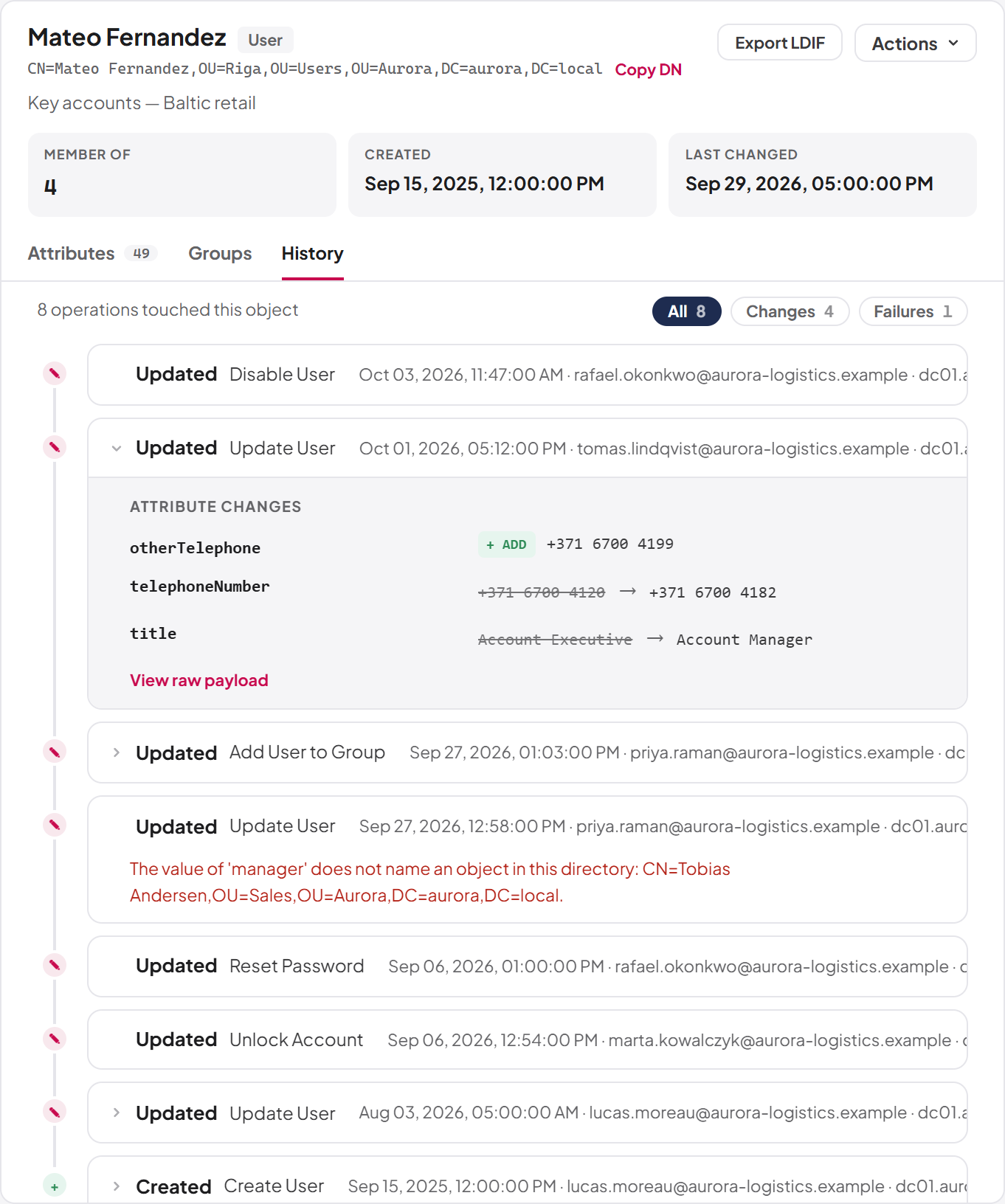
The History tab shows what has been done to the selected object through SYNERGY Management Gateway — from the browser, through the REST API, by AI agents or by n8n workflows. It reads the operations log, so you can investigate an object without leaving the tree. You need the audit:list permission to see it.
The tab shows how many operations touched the object and lists the most recent 50. Use the chips at the top to narrow the list to All, Changes or Failures. Each entry shows:
- The action (Created, Updated, Deleted or Operation), who requested it ("System" when there was no person) and when.
- The outcome: Success, Failed, Rejected or Awaiting approval.
- Under Attribute changes, the before and after values of each changed attribute, with + ADD and − REMOVE markers for values added to or removed from multi-valued attributes, and "not set" or "cleared" where a value appeared or disappeared.
- View raw payload, which shows the recorded before and after data exactly as stored.
Important: Only changes made through SYNERGY Management Gateway are recorded here. Changes made with other tools, such as Active Directory Users and Computers or PowerShell, are not. When nothing is recorded the tab says "No recorded changes".
The full operations log, approvals and waiting operations are described in Chapter 9, Operations log, approvals and waiting operations.
Last updated
Thank you for your feedback.