
5.2The Connections page
Last updated
To open the page, select Directory › Connections in the navigation. The page title is Active Directory Connections.
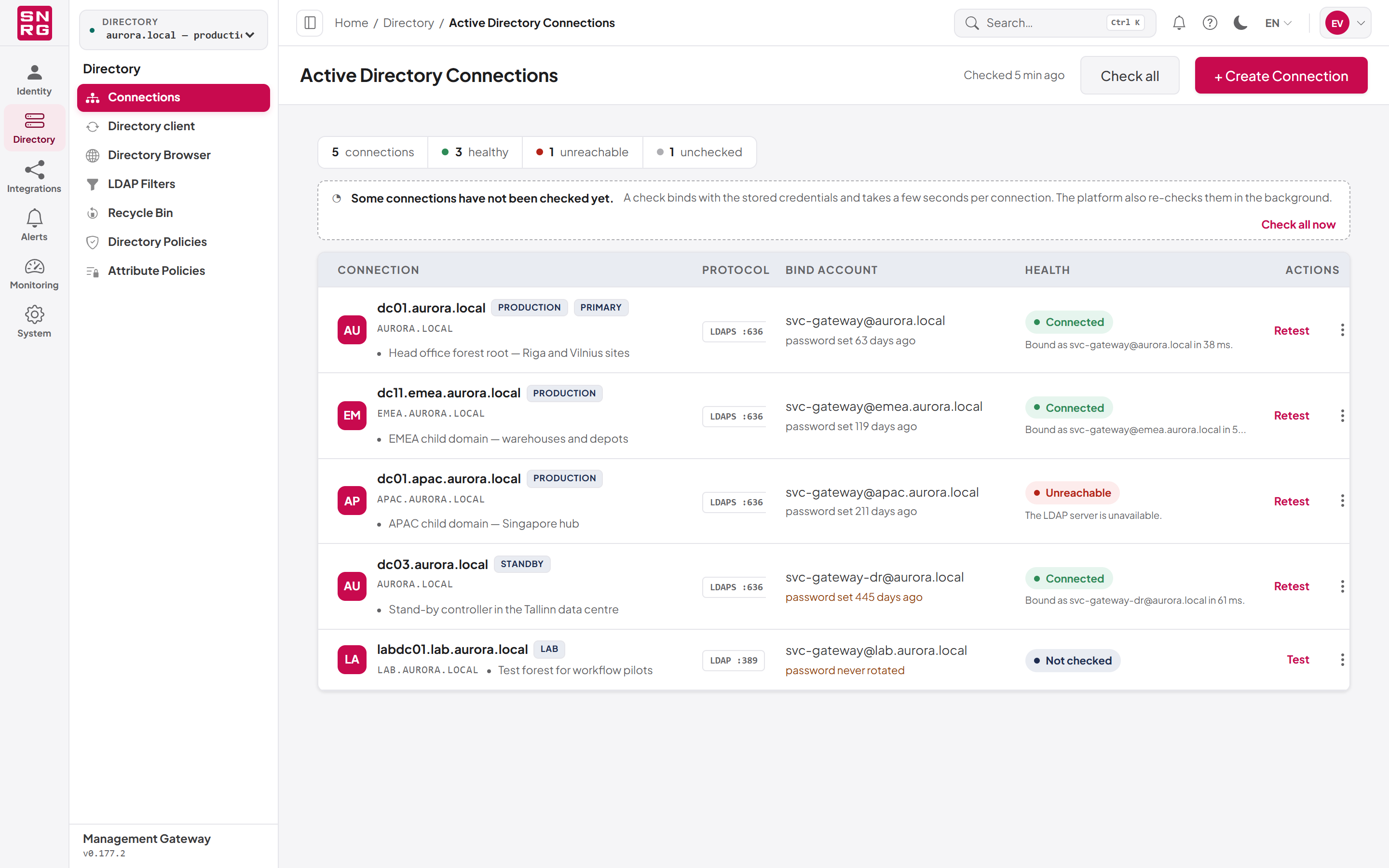
The summary strip
When at least one connection exists, a strip at the top of the page breaks the total down by health:
- the number of connections in total,
- how many are healthy,
- how many are unreachable,
- how many are unchecked.
Every connection falls into exactly one of the three health buckets. The total counts every connection; the healthy, unreachable and unchecked counts describe the connections on the page you are viewing, so with more than ten connections they add up to the number on the current page rather than to the total.
If any connection on the page has never been checked, a notice reads "Some connections have not been checked yet." with a Check all now link. See 5.6 Health and testing.
The connection list
Each row shows:
| Column | What it shows |
|---|---|
| Connection | The domain controller's host name, the domain, the description (if any) and the connection's tags |
| Protocol | LDAP or LDAPS followed by the port, for example LDAPS :636 |
| Bind account | The service account name and how long ago its password was last set |
| Health | Connected, Unreachable or Not checked, with the latest message or the age of the last check |
| Actions | Test (or Retest), and Edit on an unreachable row |
The password age under the bind account reads, for example, "password set 40 days ago". It is highlighted as a warning when the password has never been rotated since the connection was created ("password never rotated") or when it was set more than a year ago.
The row menu (the three-dot button at the end of the row) offers Edit and Delete, depending on your permissions. You can also double-click a row to open it for editing if you hold adconnections:update.
The list shows ten connections per page; use Previous and Next to move between pages.
The page refreshes itself once a minute while it is visible, so health readings recorded by the platform's background checks appear without you reloading. The refresh pauses while the browser tab is hidden and while a check you started is still running.
Before you create a connection
Have the following ready:
- A domain controller name that the server running SYNERGY Management Gateway can resolve and reach. A fully qualified name such as
dc1.corp.localis best; an IP address also works. - Network access from that server to the domain controller on the port you will use: 389 for LDAP, 636 for LDAPS (or 3268/3269 for the Global Catalog).
- A service account in the domain, with a password that does not expire unexpectedly, and with the Active Directory rights the platform should exercise.
- For LDAPS: a certificate on the domain controller that the platform's server trusts.
- Optionally, the base DN of the part of the directory you want the platform to manage.
Tip: Use LDAPS for production. With plain LDAP the bind and every change travel unencrypted on the network.
Last updated
Thank you for your feedback.