
7.2Before you start
Last updated
Licence
The Recycle Bin is a licensed module. Your licence must include the Recycle Bin feature (recycle-bin, described on the licence screen as "Restore deleted directory objects and reapply their attributes"). Without it, the Recycle Bin item does not appear in the navigation and every Recycle Bin request is refused. See Chapter 19, Licence, updates and backups.
A directory connection selected
The screen always works on the directory currently selected in your workspace. There is one recycle bin per domain, so you never choose a container: the listing, the counts and every restore apply to the workspace's active connection. If you need to restore an object in another domain, switch the workspace to that directory first. See Chapter 4, Working in the console, and Chapter 5, Directory connections.
Permissions
| Permission | What it allows |
|---|---|
ad:deleted-objects:list | Open the Recycle Bin screen and see what has been deleted and is still restorable |
ad:deleted-objects:restore | Restore a deleted object (except privileged ones) |
ad:deleted-objects:restore-privileged | Restore an object that comes back with administrative privilege, and write access-related attributes back to it |
ad:deleted-objects:reapply-attributes | Write a restored object's attributes back from the copy kept before it was deleted |
ad:objects:read | Together with the restore permission, lets the restore dialog check the destination and name before you submit |
ad:directory:read | Shows the Browse the restored object link after a restore |
In the permission editor these appear under the Recycle bin resource. The predefined Recycle Bin Operator role template ("Undoes deletions, and nothing else.") grants listing, restoring and reapplying attributes together with ordinary directory reads, but deliberately not the privileged restore. See Chapter 11, Users, roles and permissions.
Tip: A user who holdsad:deleted-objects:listbut notad:deleted-objects:restorecan open the screen and see the deleted objects, but no Restore action is shown in the rows. This is useful for auditors who need to see what was deleted after an incident.
Rights of the connection's service account
Every directory operation runs with the account configured on the directory connection. For the Recycle Bin to work, that account must be allowed to read the Deleted Objects container and, to restore, must hold the Reanimate Tombstones right on the domain and the right to create objects in the destination container. If it lacks these, Active Directory refuses the operation and the console shows the error it returned.
Opening the Recycle Bin
- In the navigation, open the Directory group.
- Select Recycle Bin.
The page header shows two chips: the number of restorable objects (for example "152 restorable") and the state of the Active Directory Recycle Bin feature, either Recycle Bin on or Recycle Bin off.
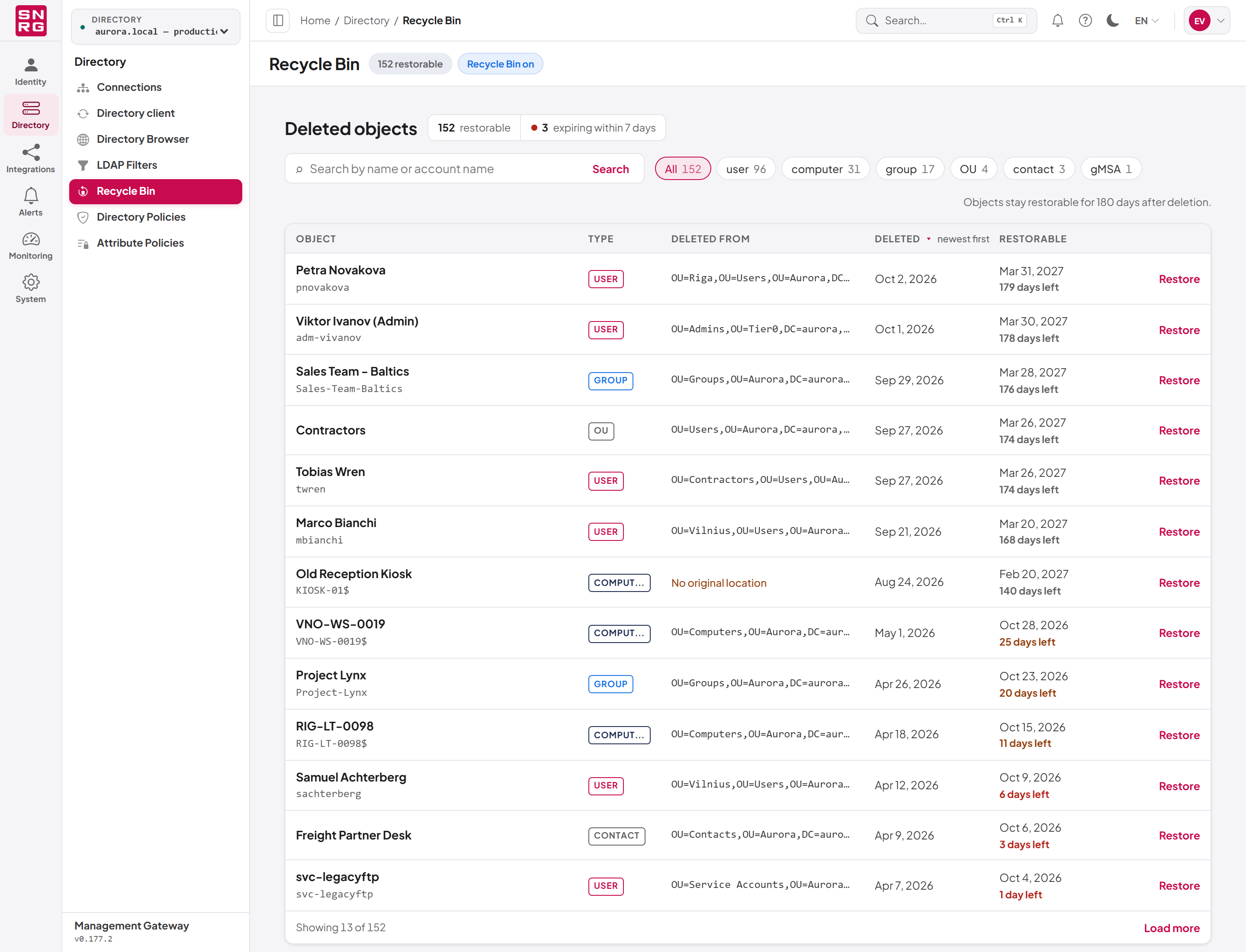
Last updated
Thank you for your feedback.