
16.4Notification history
Last updated
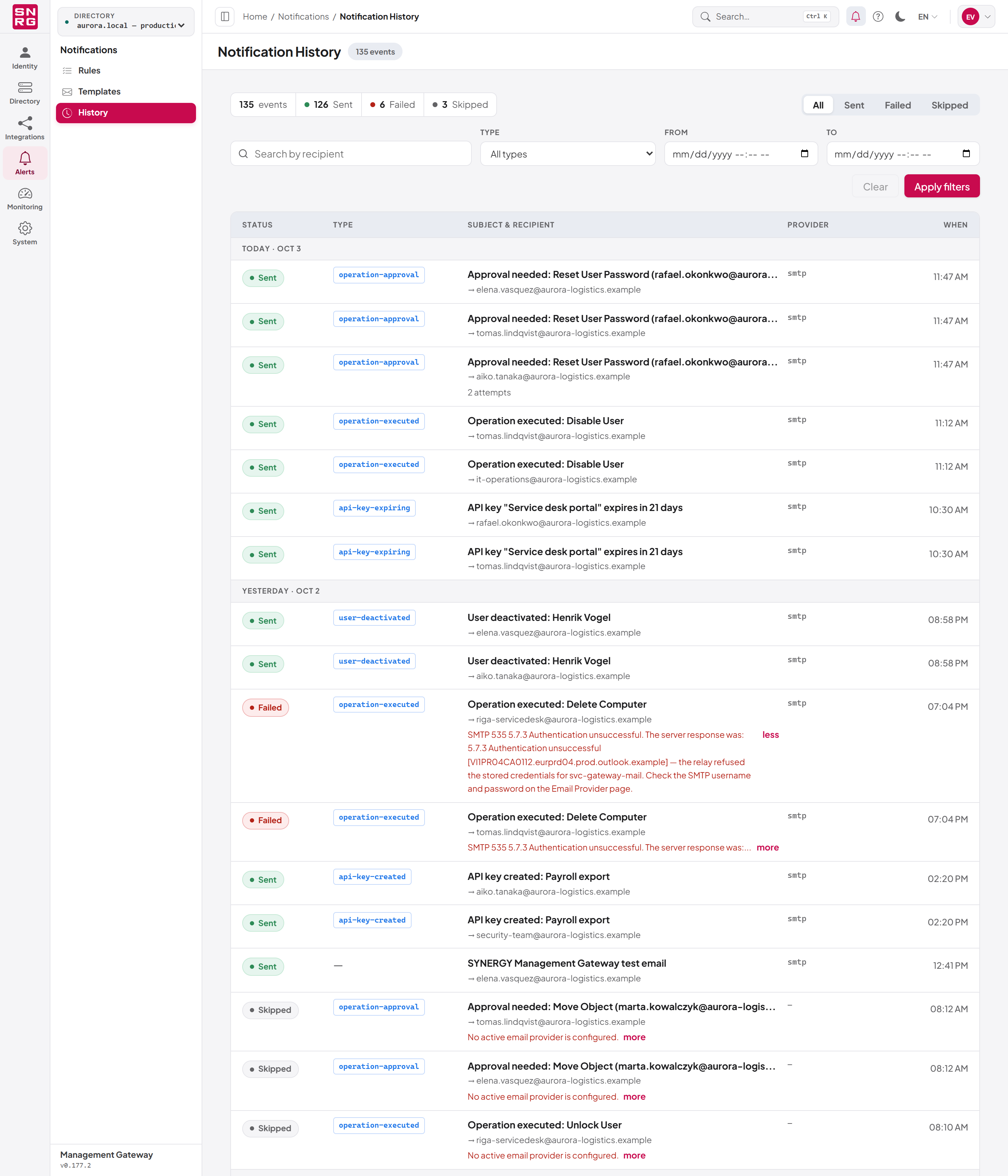
Notifications > History is a record of every email the platform has tried to send — notifications, test emails and account emails alike. Use it to check that an email went out, to see why one did not, and to see which provider sent it.
To view it you need the notifications:history permission.
What the history shows
| Column | Description |
|---|---|
| Status | Sent, Failed or Skipped |
| Type | The notification type, for example operation-approval |
| Subject & recipient | The email's subject and the address it was sent to |
| Provider | The code of the provider that handled it: smtp, microsoft-graph or google-workspace. A dash when no provider was active |
| When | The time of the attempt, grouped under Today, Yesterday and earlier dates |
The statuses mean:
- Sent — the provider accepted the email. If it took more than one try, the row shows the number of attempts, for example "2 attempts".
- Failed — the provider refused or could not be reached, after all retries. The error from the provider is shown on the row; long errors can be expanded with more and collapsed with less.
- Skipped — the platform did not try to send, typically because no email provider was active.
Above the list, a summary shows the total number of events and how many were Sent, Failed and Skipped.
"Sent" means the provider accepted the message for delivery. Whether it then reached the inbox (spam filtering, mailbox rules) is outside the platform's view; check your mail system's logs if an email marked Sent did not arrive.
Filtering the history
- Open Notifications > History.
- Choose a status with the chips at the top: All, Sent, Failed or Skipped.
- Optionally type part of an address in Search by recipient, choose a Type (or All types), and set From and To dates.
- Select Apply filters. Select Clear to remove the filters.
The footer shows which events are on screen (for example "Showing 1–20 of 135 events") and the page number. Select Load older to go further back and Previous to return to newer events.
How long the history is kept
Delivery records contain email addresses, and subjects that name people and objects, so they are not kept forever. By default, records older than 180 days are deleted automatically. An administrator can change this in the server configuration under EmailNotifications:DeliveryLogRetention (Enabled, RetentionDays). A period shorter than 7 days is raised to 7 days.
Last updated
Thank you for your feedback.