
10.3Installation-wide and per-directory policies
Last updated
Every operation has one installation-wide (global) policy. In addition, for any operation that runs against a directory, you can record a stricter setting for a single Active Directory connection — a per-directory override.
Overrides can only tighten
A per-directory override can make a directory stricter than the installation default, never more permissive:
| Setting | How the two levels combine |
|---|---|
| Enabled | Both must allow it. A directory can block an operation the installation allows, but cannot allow one the installation blocks. |
| Auditable | Either can require it. A directory can audit an operation the installation does not, but cannot stop auditing one the installation audits. |
| Always ask agents | Either can require it. A directory can make agents ask where the installation does not, but cannot remove a global pin. |
Overrides are sparse: a directory has an override only for the operations where somebody made a decision for that directory. Everything else inherits the installation default.
Working in per-directory scope
To configure one directory on its own:
- Select the directory in the top bar's directory picker (see Chapter 4, Working in the console).
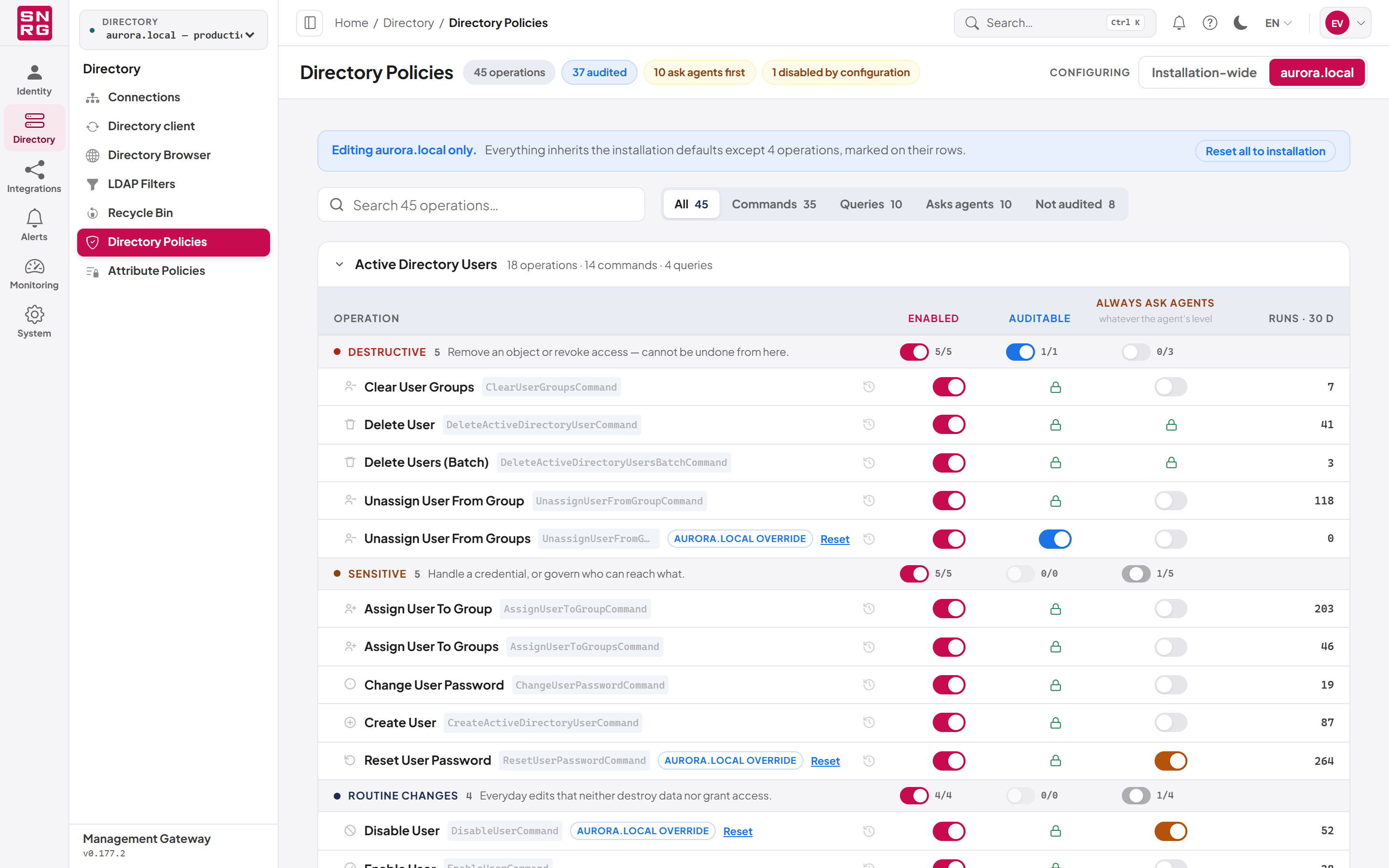
- Open Directory Policies and set Configuring to the directory's name (for example aurora.local) instead of Installation-wide.
- A tinted note above the list reads "Editing directory only." and says how many operations differ from the installation defaults.
- Change switches as described above. The switches show what will actually happen in that directory — the combined result of the global and per-directory settings.
Operations whose outcome in this directory differs from the installation default are marked with a badge naming the directory (for example "aurora.local override").
Returning a directory to the installation defaults
- To clear one operation's override, click Reset on its row. All three settings for that operation return to the installation policy.
- To clear every override for the directory, click Reset all to installation in the tinted note.
Note: Precedence runs from the outside in: the configuration file first, then the per-directory override, then the global policy. Each level can add a control; none can remove one set by another.
Last updated
Thank you for your feedback.